Your channel ships while you sleep.
It picks the topic, writes the script, records the narration, edits the video and uploads it to YouTube — all on your own machine. The AI and text-to-speech accounts are yours: you enter your key, requests go straight to your provider, and your provider bills you. We sell no credits and charge no per-video fee.
Windows 10/11 · One-click install · Unlimited videos
- Runs on your own machine
- Your own provider accounts
- No per-video fee
This software made these videos
I typed nothing but the topic. It found the sources, wrote the script, narrated it, cut the footage and aligned the captions word by word.
These videos cost nothing to make: a free Groq key, NASA and Wikimedia imagery, and XTTS narration running on our own machine. No paid service was involved. Both came straight out of the pipeline; the only edit was trimming the subscribe card at the end (so the channel stays unnamed).
Topic to upload, hands off
Five stages. You describe the channel once; everything after that repeats itself every day.
- 01
Finds the topic
It draws from the channel's own topic pool, or picks up what the world is actually reading today. You can also just type a sentence — “a short summary of Michael Jackson” — and it resolves that to the right article itself.
- 02
Writes the script
It gathers sourced material from Wikipedia and turns it into a script in your channel's voice. Checked BEFORE rendering: empty scenes, repetition, stray foreign alphabets and fictional references send it back for a rewrite.
- 03
Records the narration
Locally with XTTS, in the cloud with ElevenLabs, or free with Edge. Voice and speaking rate are set per channel. When a word comes out wrong, you add it to the pronunciation dictionary and it is fixed from then on.
- 04
Edits the video
Real archive photography, word-by-word highlighted captions, gentle motion that changes direction each scene, and background music. AI imagery is used only where no real photograph exists.
- 05
Publishes it
Uploads to YouTube at the hour you set. If a video exceeds a platform limit it is held for your approval instead of going out. If production fails, a backup from the stock pool goes out — the slot is never empty.
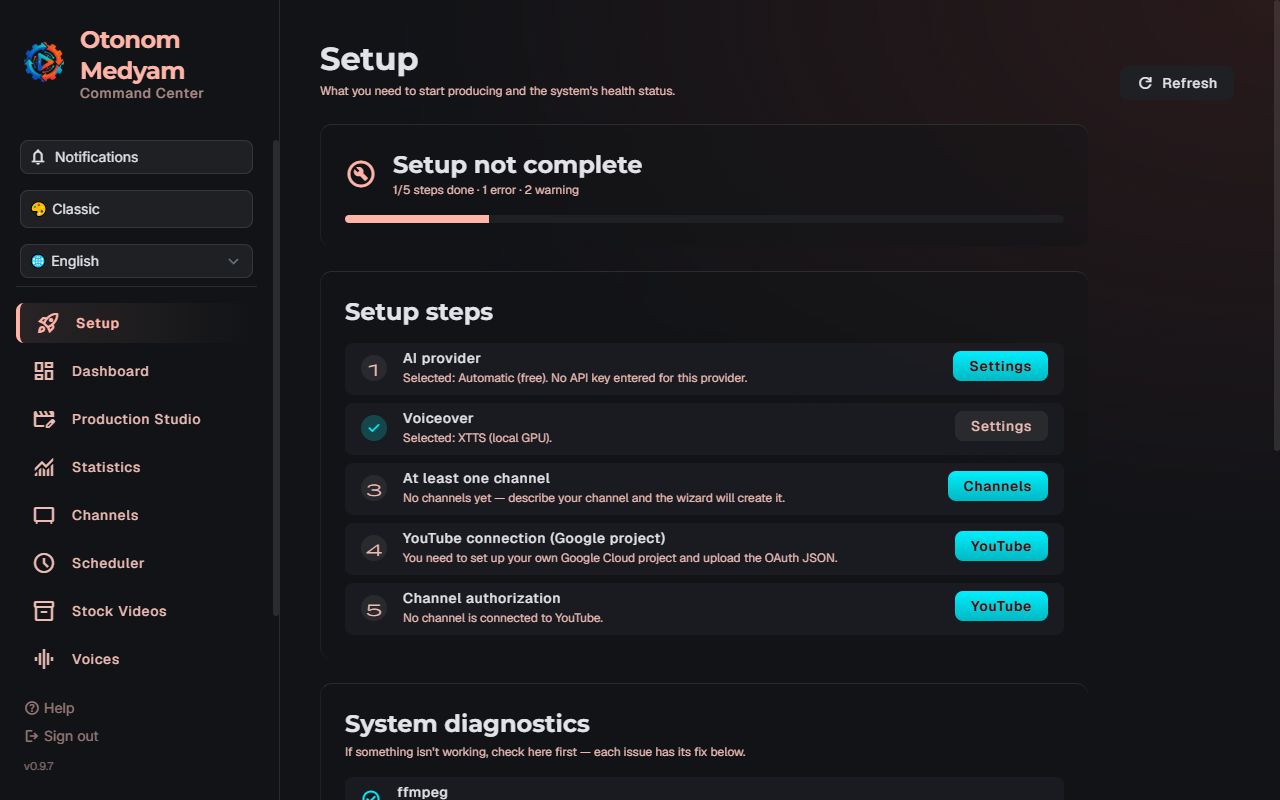
All of it is visible live on the Content Flow screen — which stage, how much is left, from which source.
Try it on your own channel
Steer your channel by talking to it
No hunting through settings screens. Write what you want; the system shows you what it would do, and the decision to apply stays with you.
Lean more into Ottoman history of science
3 topics will be added to the pool: Ottoman history of science, Ali Kuşçu, Taqi ad-Din
Narrate more calmly, less over the top
The narration tone will change: calm, measured, understated
No exclamation marks in titles
Title rule will be: do not use exclamation marks in titles
Make a video about Atatürk tonight
A video on 'Atatürk' will be produced now (it will not be published — you see it first)
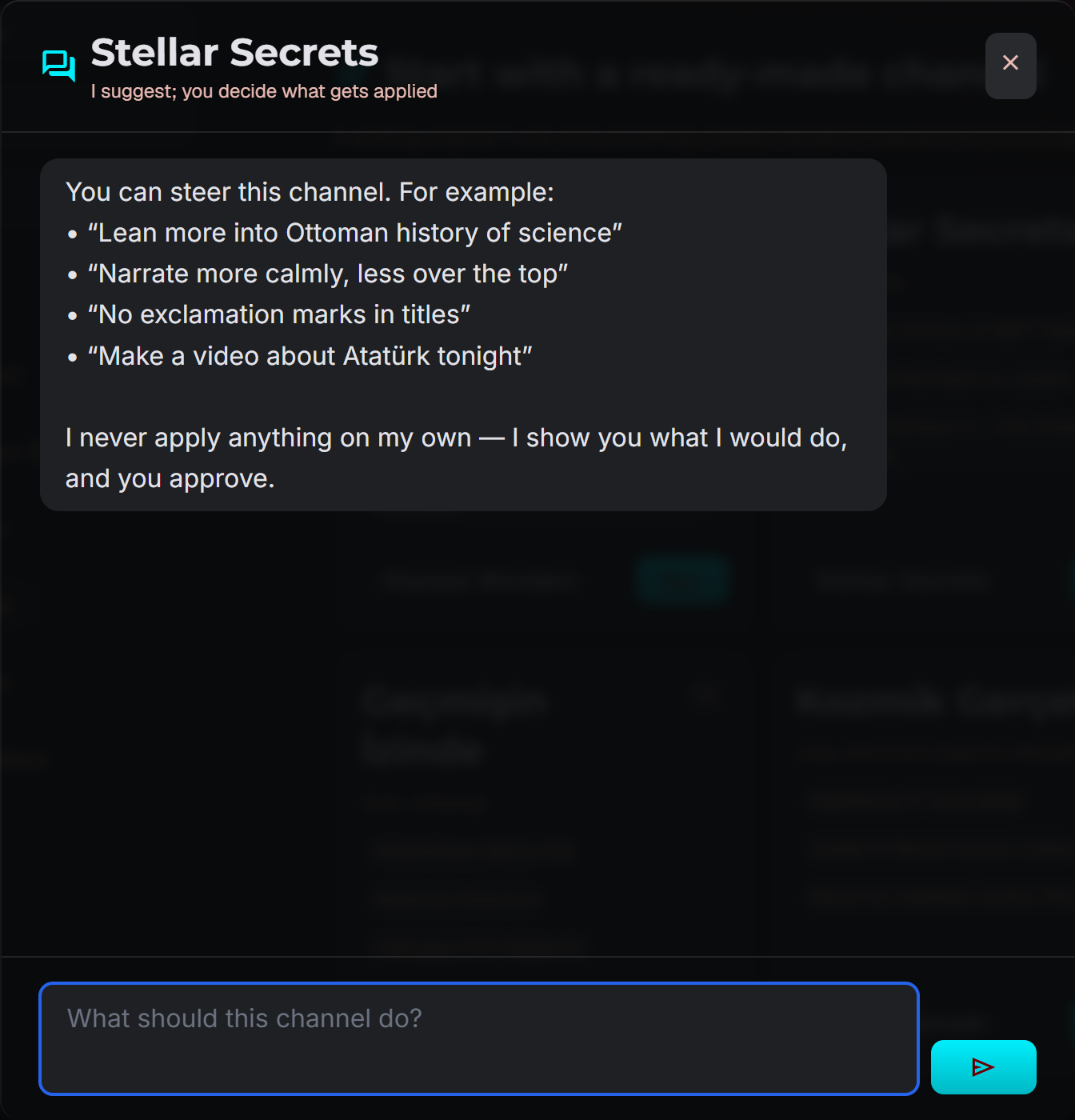
Nothing changes without your approval
The assistant never changes a setting, produces a video or publishes on its own. Every suggestion arrives as an approval card; not a single line of your channel changes until you press “Apply”. And once applied, one click undoes it.
Right even when nobody is watching
In a system that runs unattended, the hard part isn't producing. It's catching the one that came out wrong.
Autonomous scheduler
Set your publishing hours and forget them. Each video is prepared an hour before its slot. If production fails, a backup from the stock pool goes out instead; the slot is never wasted.
Quality gate
Scripts are checked before rendering, videos after. Anything below the hard threshold is never published — it is produced again. Anything below target lands in your approval queue.
Your own provider accounts
OpenAI, Claude, Gemini, DeepSeek, Mistral, Grok, Groq and more — 11 platforms. You open the account, you enter the key, the provider bills you. We neither supply nor resell AI services. Free tiers mean you can start without a key at all.
Licence and attribution gate
An image without a free licence is blocked before it is ever downloaded. Every image that requires CC BY / BY-SA gets its credit line written into the video description automatically — you never have to remember to attribute.
17 content languages
English, Turkish, Spanish, Portuguese, French, German, Italian, Polish, Russian, Dutch, Czech, Hungarian, Arabic, Chinese, Japanese, Korean and Hindi. The word budget scales per language, so the runtime you target is the runtime you get.
Push notifications
Get a Telegram message when a video goes live, a run fails or a new comment arrives. You use your own bot: the token stays on your computer and the messages never touch our servers. Mute the night hours and let only the urgent ones through.
A channel is one file
Describe your channel in a sentence and the AI derives the persona and the rules. Brand assets are generated too. Launching a new channel means dropping in a new file.
Your content stays yours
The only thing that reaches our cloud is a licence check. Your videos, your keys and your voices stay on your disk.
Cancel and your videos remain
With cloud tools, the archive leaves when the subscription does. Here the files were on your disk the whole time.
No markup on AI cost
You enter your own key and pay the provider directly. We are not in the middle of that transaction.
Your keys never reach us
They go only to the provider they belong to. The licence check carries no key of any kind.
What actually leaves your computer?
The complete list. Nothing withheld.
| What | Where | When |
|---|---|---|
| Topic and source text | Your AI provider | Every production |
| Script text | Your narration provider | Never, if you use XTTS — it's local |
| Finished video | YouTube | Only when you publish |
| Version, operating system | Our licence server | On the licence check |
| Your voice recording | ElevenLabs | Only if you press that button |
No fee per video.
We don't sell credits and we don't bill you for AI — you run on your own keys and we take no cut of what they cost. The only thing separating the plans is how many channels you run.
Solo
For going solo with a channel or two.
$190 billed once a year
Buy nowor try 1 month free- 2 channels
- Unlimited videos
- Install on 2 computers
- Autonomous scheduler + stock pool
- Quality gate
- 17 content languages
- Licence gate + automatic attribution
- All updates included
Creator
For growing several channels in parallel.
$290 billed once a year
Buy now- 5 channels
- Unlimited videos
- Install on 3 computers
- Autonomous scheduler + stock pool
- Quality gate
- 17 content languages
- Licence gate + automatic attribution
- All updates included
Studio
For agencies and channel portfolios.
$490 billed once a year
Buy now- Unlimited channels
- Unlimited videos
- Install on 5 computers
- Autonomous scheduler + stock pool
- Quality gate
- 17 content languages
- Licence gate + automatic attribution
- All updates included
On every plan, AI and narration costs are paid directly to the provider — we are not in the middle. Free tiers let you start without a key at all.
1 month free.
The full Solo plan — 2 channels, unlimited videos and real YouTube publishing. Not a limited demo — the product itself.
- One-click install
- Full version, nothing locked
- Your videos stay yours
- Push notifications
Your card is collected by Polar, our payment provider; nothing is charged for the first month. When it ends it continues as the Solo monthly plan ($19/month) — stop before then and you are not charged.
What you should know up front
Are you selling AI?
No. Otonom Medyam is desktop automation software; we do not supply, sell or resell any AI service. You open your own OpenAI, Groq or ElevenLabs account and enter the key into the app; requests go from your computer straight to that provider, and that provider bills you directly. Your keys never reach us — the only thing you can buy from us is a licence for the software.
Does my computer have to stay on?
Yes. The scheduler only produces while the app is running; if the machine shuts down or sleeps, production stops. The installer offers to start it at boot. We say this up front because it isn't something you should discover later.
How do I find out when something goes wrong?
The panel has a notification bell: a video published, a run that failed, a slot skipped by the quality gate, a new comment, a subscriber milestone — they all land there. You can also get the same events on your phone over Telegram. You use your own bot (two minutes with BotFather), so the token stays on your computer and the messages never touch our servers. Mute the night hours and let only the urgent ones through: production stopped, YouTube authorization expired, budget exceeded.
Windows only?
Yes — Windows 10/11 (64-bit) for now. No macOS, no Linux, and we're not promising them soon either.
What will the AI cost me?
Entirely up to the provider you choose. Free tiers (Groq, OpenRouter) let you start at zero cost; if you use Claude or OpenAI for quality it runs to a few cents per video. We don't take any of that money — you pay the provider directly.
What do I need to upload to YouTube?
Your own Google Cloud project. There's a step-by-step wizard inside the app. It's extra setup, but in return your channel doesn't depend on our quota or our account. Note: while Google's consent screen is in “Testing” mode, authorisation expires after 7 days; the wizard explains that and the permanent fix.
What else does it do to my channel — comments, likes, engagement?
None of that. The only thing it does is upload a video to your own channel using your own Google account. It never touches anyone else's account, never posts comments, never brings likes or subscribers, and connects to no engagement-selling service of any kind. The statistics screen reads YouTube's public numbers, nothing more.
Can I set the exact video length?
You set a target, but the real length emerges from the narration and scatters roughly ±25% around it. The system measures the finished video; if it crosses a platform limit it is held for your approval rather than published automatically.
What happens if I cancel?
Your produced videos, channel settings and keys stay on your disk — none of it is deleted. New production stops. That's all.
Do you offer refunds?
Within the first 14 days we refund you, no questions about how much you used it. Your first month is free anyway — we'd rather you tried the product before paying for it.